
In short: With every refresh, the coworker follows three guidelines: the rules per data area, the method and the lists. You will find all three in the Setup tab. Coworkers can only propose changes. Nothing changes without your approval.
The three guidelines
Before delivering new data, the coworker follows three guidelines:- Rules per data area: For each data area, it is documented in writing how its figures are produced. The rules answer four questions: What does the area cover? Which sources does the data come from? How is it assessed? Which gaps are known? Example: For “Prices per week”, the rules might define which retailers and sources count. They might also say what happens if there is no new price in a given week.
- Method: A text with definitions that apply equally to all data areas. This ensures all areas work to the same standards. Example: whether “a week” means Monday to Sunday or the last seven days.
- Lists: The people, media or regions the dashboard monitors. Example: a company’s main competitors or the relevant trade media in an industry.
What the rules of an area contain
In the Setup tab, the rules are under Rules per data area. The example shows a data area called “Competitor news”.Scope: what the area covers
Scope: what the area covers
What the area covers and what it does not.Example: “News, product launches and campaigns from our three main competitors Contoso, Fabrikam and Northwind. Only the last seven days. No job ads, no stock market news.”
Sourcing: where the data comes from
Sourcing: where the data comes from
The sources and the order in which they are trusted.Example: “First the competitors’ press pages. Then two trade magazines of the industry. Social media only to confirm something found elsewhere.”
Rules: how the data is assessed
Rules: how the data is assessed
The rules that keep every week comparable.Example: “One entry per news item. The headline in our own words, 15 words at most. Always include the date and a link. If two sources report the same thing, keep only the earlier one.”
Known gaps: which gaps are known
Known gaps: which gaps are known
Honest limits, so nobody is surprised.Example: “Northwind publishes press releases only in Swedish. We may miss small announcements.”
Parts: which lists the coworker may maintain
Parts: which lists the coworker may maintain
Some areas work with lists that change a little over time, such as the list of tracked competitors. This part defines which lists the delivering coworker may update itself, and which fields in them.
Proposals: nothing changes without your approval
If a rule no longer fits or a new name belongs on a list, the coworker submits a proposal. You will find it in the Setup tab under Open proposals. Each proposal shows the current text, the new text and the reasoning.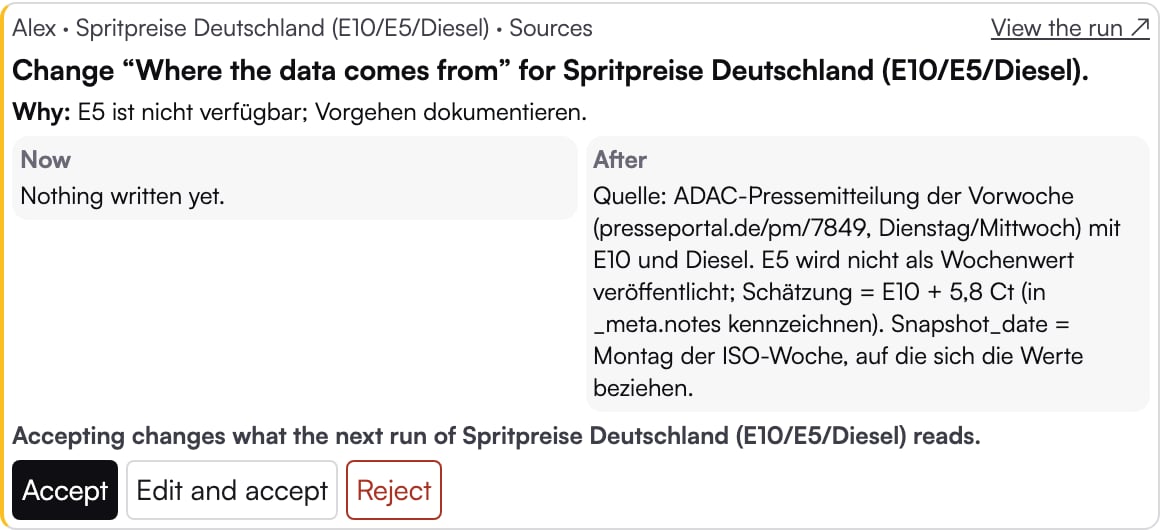
An open proposal in the Setup tab
- Accept: The change applies from the next run.
- Edit and accept: You adjust the wording and then accept the change.
- Reject: You give a reason. The coworker sees it on the next run.
Areas without rules
Not every data area has written rules. The coworker still delivers data. Its approach, however, is not documented anywhere. Which sources it uses and how it assesses them can therefore change from run to run. So can the results. Write them down closes this gap. The delivering coworker writes down how it has produced the area so far. You receive the result as proposals that you can accept, edit or reject. The coworker does not fetch any new data in the process. In the dialog, under What matters to you? (optional), you can say what is important to you about the rules. Before you start, you see a cost estimate. If you would rather write the rules yourself, use Write them myself.What you can do next
Data areas and refreshes
Cadence, delivery and run time.
Frequently asked questions
For example: what happens if I don’t act on a proposal?